
Google Cloud, migration

The most expensive stretch of migrating to Google Cloud is usually the middle, when workloads already running on Google Cloud are still being billed on AWS, Azure or in your data center. Take a $60,000 monthly AWS bill moved in six monthly waves. Shut each source down one month after its wave cuts over, and the overlap costs $60,000. Leave every source running until the last wave, and the same migration costs $210,000 in overlap alone.
That $150,000 gap comes from one decision, made workload by workload, and a GCP migration is a long series of decisions like it. For every application, the team chooses how it moves (unchanged, onto a managed platform, or rewritten), in which wave, and when its source is switched off. Each choice sets two bills: the one-off cost of moving and the run-rate once the workload lands.
This guide covers when a move to Google Cloud pays off and which workloads should stay where they are, the six migration strategies Google defines and how to choose one per workload, the foundation to build before anything moves, the eight steps of the migration itself, and the mistakes that cause overruns. Here is the complete guide on how to plan GCP migration.
Is migrating to Google Cloud worth it?
A migration pays off when a specific situation makes the current platform more expensive or more limiting than the cost of leaving it. The five triggers below are the ones that justify a migration:
- A cloud commitment or contract ends within the next 12 months. The window to plan a move is before the next multi-year commitment is signed, because a new commitment locks the run-rate to the current platform for its full term.
- Your analytics already runs on BigQuery. Every pipeline that copies data from another cloud into BigQuery pays to move that data out of the source cloud on every run. Moving the systems that produce the data removes that cost; our guide to migrating to BigQuery from AWS or Azure covers when the warehouse itself should move first.
- AI workloads need Vertex AI or TPUs close to the data. TPUs run only on Google Cloud, and training or serving next to the data avoids moving large datasets between providers.
- A customer or regulator requires data to stay in the EU. Google Cloud can enforce EU-only locations across an entire organization with one policy, set up as part of the foundation described below.
- The cloud bill grows faster than revenue and nobody can explain why.
When Google Cloud migration doesn’t make sense for your workloads
All six of Google’s migration strategies describe ways to move a workload, yet most estates contain workloads that cost more to migrate than they will ever save. Leave these in place, or retire them:
- Services built around a provider-specific database or queue, such as a DynamoDB-centered design, where every Google target changes the data model and turns the move into a rewrite.
- Systems refactored in the last 12 months, where the team has just paid for an architecture tuned to the current platform.
- Applications scheduled for retirement within 12 to 18 months. Retire them on their current platform.
- Low-spend workloads where the migration effort exceeds two years of the expected savings.
6 Google Cloud migration strategies: which one fits each workload
Google’s migration framework runs in four phases (assess, plan, deploy, optimize) and defines six ways to move a workload, called the 6Rs of migration.
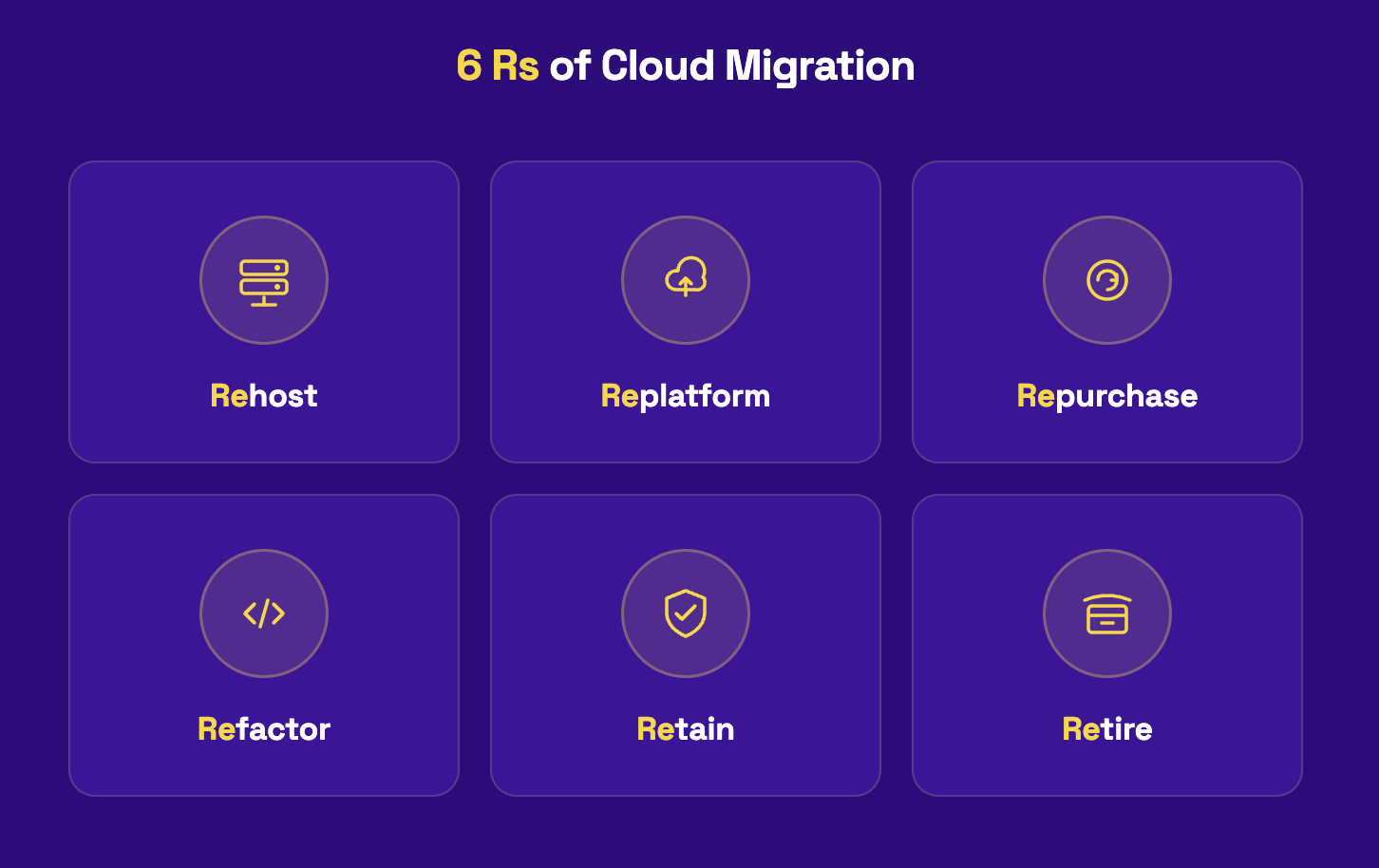
1. Rehost (lift and shift)
Rehosting moves a workload with minor or no modifications. Migrate to Virtual Machines does the work, replicating VMs from on-premises, AWS or Azure in the background while the source keeps running. It is the fastest route and fits moves driven by a deadline, such as an expiring contract.
2. Replatform (lift and optimize)
Replatforming keeps the code and replaces the layer underneath it. The common case is a self-run MySQL or PostgreSQL server moving to Cloud SQL or AlloyDB through Database Migration Service, which charges nothing for those same-engine migrations. It suits ops-heavy stacks where the team spends its week patching databases. And stops being enough when the code itself limits how the application scales.
3. Refactor (move and improve)
Refactoring changes the code so the workload uses cloud services, for example a scheduled batch job rewritten to run on Cloud Run. Google notes that it needs new skills and more time. It earns its cost on core products that change every week, and it fails when the business deadline is shorter than the refactor.
4. Re-architect (continue to modernize)
Re-architecting changes how the application is structured, typically splitting a monolith into services. It carries the most testing of any strategy that keeps the original codebase. It is justified when the current design blocks scale or release speed, and only if the team can operate a distributed system once it is built.
5. Rebuild (remove and replace)
Rebuilding decommissions the application and writes a cloud-native replacement. It is rarely the right first move, because the old system has to keep running until the new one is proven, which makes it the longest overlap of any strategy.
6. Repurchase
Repurchasing replaces a self-hosted product with a SaaS equivalent. Google describes it as simpler but potentially costlier, with less control. The migration work becomes data export, identity integration and user change management.
What does a Google Cloud migration cost?
Take a company of about 300 people running on AWS. It is moving 140 VMs, 50 TB of data in Amazon S3, one MySQL database and one Oracle database to Google Cloud over six months. Google prices in US dollars, so this section does too.
The one-off bill, line by line
- VM migration tooling. Migrate to Virtual Machines carries no service charge for migrations into Google Cloud. The bill comes from the Compute Engine VMs created for test clones and cutover, plus the EC2 instances, EBS volumes and network traffic AWS charges while replication runs.
- Databases, where the engine choice reaches the tooling bill. Moving MySQL to Cloud SQL for MySQL costs nothing in Database Migration Service charges. Moving Oracle to PostgreSQL is a cross-engine migration, billed per GiB processed. A month with 2 TiB of initial load (backfill) and 1.5 TiB of ongoing changes (change data capture) costs (2,048 − 500 free) × $0.40 = $619.20 for backfill, plus 1,536 × $2.00 = $3,072 for change data capture, so $3,691.20 for that month at us-central1 rates, before the target database itself.
- Data transfer time. 50 TB over a 1 Gbps link takes 4.6 days at full line rate and about 6.6 days at a realistic 70% utilization. Google recommends Transfer Appliance when an upload would take more than a week. On a 500 Mbps link at the same utilization, the same 50 TB takes about 13 days, which tips this company toward the appliance.
- Data transfer cost. AWS charges for data leaving AWS unless the move qualifies for its exit waiver, covered under the offsets below.
- Dual running. Monthly source spend multiplied by the months each wave overlaps. As the opening example showed, decommissioning each wave a month after cutover instead of at the end of the program is worth $150,000 on a $60,000 monthly bill.
- People. Engineering time for testing and cutover, plus partner or Google Professional Services fees if the team brings in help.
What offsets the bill
- RaMP funding. Google’s Rapid Migration and Modernization Program provides service funds worth 20% of a workload’s projected annual recurring revenue on Google Cloud, capped at $2M per workload, toward partner or Google Professional Services fees. A workload projected at $500,000 a year qualifies for $100,000. RaMP also pays quarterly credits on the incremental growth of workloads tagged to the program.
- The AWS exit waiver. AWS waives data transfer out for customers moving all their data off AWS, or all their data off one service. The customer requests it through AWS Support, and AWS issues credits for the migrated data once it approves. Customers outside the EU get 180 days to complete the move; EU customers follow the process in AWS’s EU Data Act addendum. A partial move, such as moving only the analytics stack, does not qualify.
- The EU Data Act. The regulation requires cloud providers to abolish switching charges three years after it entered into force, which falls on January 12, 2027. For a European company, a migration that cuts over after that date should face no switching charges from the provider it leaves.
Build the foundation for GCP migration
The foundation, often called the landing zone, is the structure every workload lands in: the resource hierarchy, identity, network, security policy and logging. Google warns that a poorly planned foundation can delay the migration and put it at risk. Treat it as a gate: no workload moves until the four areas below are built and tested.
1. Resource hierarchy and billing
Google Cloud organizes everything into an organization, folders and projects. Teams arriving from AWS tend to recreate one project per AWS account and stop there, which leaves billing reports, access, and policy with no structure above the project.
Design the folders around who owns what (business units, environments, or both) before the first project exists, because billing exports and cost reports follow the hierarchy from day one.
2. Identity and access
Federate your existing identity provider so people sign in with the accounts they already have. The access model is the biggest change for an AWS team. In Google Cloud, roles granted on an organization, folder or project are inherited by everything beneath it, and a resource’s effective access is the union of its own policy and every policy above it.
A role granted carelessly at the organization level reaches every project. Give each workload its own service account with the roles it needs, and never run workloads on the default service account. Our guide to sequencing Google Cloud security debt shows how those defaults turn into findings.
3. Network and connectivity
VPC networks in Google Cloud are global, and subnets are regional, so one network can span every region you use without peering between regions. Shared VPC keeps the network in a central host project while workload projects deploy into its subnets, which gives the platform team control of routing and firewall rules. Connect the source environment with Cloud VPN or Cloud Interconnect for the migration window, and plan DNS so each wave can switch independently.
4. Security, data residency and governance
Set the organization policies before anything is created. For European companies the first one is the resource location constraint with the in:eu-locations value group, which blocks resources outside EU regions across the whole organization. Add centralized audit logging, labels for cost allocation, and budgets per folder. Google’s Enterprise foundations blueprint and Cloud Foundation Fabric give you Terraform to start from instead of a blank repository.
How to migrate to Google Cloud, step by step?
Every GCP migration runs through the same eight steps, whatever mix of strategies it uses. Where a step differs for an on-premises source and for AWS or Azure, the step says so.
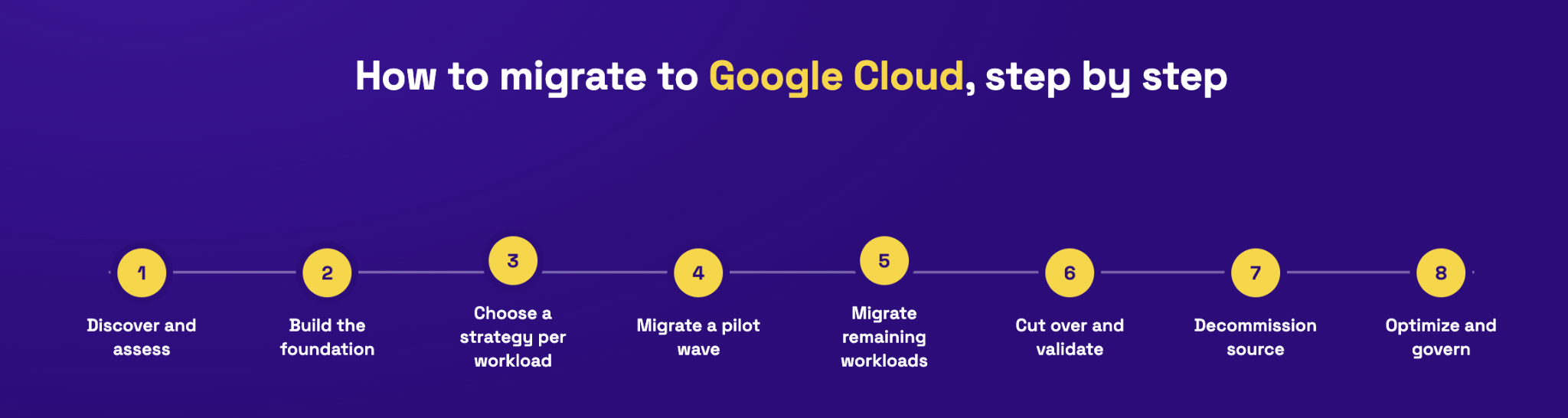
Step 1: Discover and assess the estate
Build the inventory in Migration Center, which discovers servers and databases, maps application and network dependencies, and produces total cost of ownership reports. From on-premises, run its discovery in your environment or upload inventory data manually.
From AWS, use its AWS discovery and add the per-instance details Google lists in its EC2 migration guide, such as the AMI, instance store versus EBS usage, security groups and Auto Scaling group membership. Record a performance baseline for every workload in scope, because step 5 measures against it.
Step 2: Build the business case and choose a strategy per workload
Score each workload against the four criteria in the strategy section and assign its strategy, or retain or retire it. Price the one-off bill using the six cost lines above. If you plan to use Google’s RaMP funding, run the RaMP assessment at this point. Google describes it as the step that formally qualifies a project for the program’s funding and incentives, and it produces the standardized technical report (the RaMP Exhibit) that Google requires before committing workload IDs in the Admin Console.
Step 3: Plan the waves
A wave is a group of workloads that move and cut over together because they depend on each other. Make the first wave low risk but representative: one stateless service, one database and one storage bucket teach the team more than five identical web servers. Before any wave starts, write down three dates and one rule: the cutover date, the rollback deadline, the decommission date, and the measurable condition that triggers a rollback.
Step 4: Build the foundation
Build and test the landing zone described in the foundation section. No workload moves until it passes.
Step 5: Run a pilot wave
Take the first wave through every remaining step, including cutover and decommissioning. Migrate to Virtual Machines can create test clones on Google Cloud while the source keeps running, so the team can validate a workload before committing to cutover. Compare the results against the Step 1 baseline and adjust the plan before the larger waves.
Step 6: Move the data and databases
Start the database replication early with Database Migration Service, so the cutover window only has to absorb the last changes. Choose the file transfer method from the transfer-time arithmetic: Storage Transfer Service copies from Amazon S3, Azure Blob Storage or on-premises file systems over the network, and Transfer Appliance ships the data physically when the upload would take more than a week.
Step 7: Cut over, with the rollback trigger agreed in advance
Lower DNS TTLs a few days before the cutover so the switch propagates quickly. On the day, freeze writes on the source, run the final sync, switch traffic, and keep the source intact and read-only until the rollback deadline passes. The trigger written in step 3 decides whether you roll back.
Step 8: Decommission and optimize
Shut each source down on its decommission date, wave by wave, which is the single biggest saving in the program. After 30 to 60 days of stable usage, rightsize the rehosted VMs and size committed use discounts on what the workloads actually consume.
The mistakes that make a move to Google Cloud costly
Each of these turns up in migrations that ran over budget or over time. Each one has a price, and most of them are set before the first workload moves.
- Moving workloads before the foundation exists. The team then rebuilds IAM, networking and project structure around running systems, with maintenance windows for every change it could have made for free on day one.
- Rehosting everything and stopping there. Rehosted VMs keep the sizing of the old platform and pay on-demand rates, so the run-rate savings in the business case never arrive.
- Buying committed use discounts in the first month. The discount covers capacity the workloads will shed once they are rightsized, so part of every month’s commitment pays for nothing.
- Starting a wave without a written rollback trigger. A cutover that goes wrong turns into a night of debate while users wait.
- Treating licenses as an afterthought. Physical-core licenses need dedicated hardware such as sole-tenant nodes, which changes the target machine type and the price after the strategy has been chosen.
- Leaving source environments running after cutover. Dual running stretches from weeks into quarters and becomes the largest line in the one-off bill.
- Leaving workloads untagged for RaMP. Google ties RaMP funding to workloads tagged to the program, so consumption that is not tagged does not count toward service funds or credits.
Get expert help with your Google Cloud migration
Revolgy is a Google Cloud Premier Partner with 25 years in the cloud and more than 40 certifications. We run migrations from AWS, Azure and on-premises data centers to Google Cloud. A typical engagement runs in three phases:
- Assessment: we run discovery in Migration Center, score every workload for strategy and payback, and take you through the RaMP assessment that qualifies the project for Google’s funding.
- Foundation and wave plan: we build the landing zone as a gate, group workloads into waves by dependency, and write the cutover, rollback and decommission dates for each wave before it starts.
- Migration and optimization: we execute each wave, shut sources down on schedule to keep dual running short, and size committed use discounts once usage has settled.


Frequently asked questions
1. How long does migration to Google Cloud take?
A single wave of rehosted VMs can move in a few weeks, while a program of several waves that includes database replatforming usually runs for several months. The number of waves and the database strategy set the timeline, because each wave needs its own cutover and rollback window, and cross-engine database moves need the longest testing.
2. Is Google Migrate to Virtual Machines free?
Yes, Google charges nothing for the Migrate to Virtual Machines service on migrations into Google Cloud. You pay for the Compute Engine VMs it creates for test clones and cutover, and the source cloud keeps billing its own compute, disk and network while replication runs.
3. Does AWS charge egress fees to migrate to Google Cloud?
No, if the move qualifies for the AWS exit waiver, which covers data transfer out for customers moving all their data off AWS, or all their data off one service. The waiver is requested through AWS Support and paid as credits once approved, with 180 days to finish the move outside the EU and a separate EU Data Act process inside it. A partial move pays standard AWS data transfer rates.
4. What is the difference between rehost, replatform and refactor in Google Cloud?
Rehost moves a workload unchanged, replatform swaps the managed layer underneath it, and refactor changes the code to use cloud services. A VM moved through Migrate to Virtual Machines is a rehost, a self-run MySQL server moved onto Cloud SQL is a replatform, and a batch job rewritten for Cloud Run is a refactor. Refactoring costs the most to execute and usually leaves the lowest run-rate.


