
Google Workspace, AI

Every sales team runs on the same core belief: personal judgement is what closes deals. The read on a relationship, the instinct about when to push and when to hold, the call on whether a deal is real or just filling the pipeline. These skills take years to develop and cannot be systematised away.
But the information that judgement works on is frequently wrong:
- CRM records reflect what reps remembered to log at the end of a long day, not what was actually said on the call.
- Forecast numbers reflect what the manager heard in the weekly stand-up, compressed into a figure that needs to reach the board by Friday.
- An AE walks into a discovery call with a two-minute Google search as their only research, because a proper briefing would take forty minutes they do not have.
- A proposal goes out with a competitor comparison that was accurate when someone wrote it eighteen months ago.
The inputs are late, incomplete, or assembled from whatever was fastest to find. Sales teams end up making decisions on poor information, and the gap between what happened and what was recorded shows up in close rates.
Collecting pipeline updates, preparing for calls, chasing proposal follow-ups and logging what was discussed after every meeting is coordination work, and coordination work can be automated. AI workflows in sales remove that overhead between the data and the decision.
This is Part 5 of our series on the workflows you can build using Google AI and Gemini you already pay for in Workspace. Part 1 covered finance workflows, Part 2 business operations workflows, Part 3 marketing workflows and Part 4 HR workflows.
This piece covers four sales processes that repeat across every pipeline stage, each mapped to the Google AI layer that runs it, with the steps to build it and the point where a person stays in control.
The three layers of Google AI you can use in Google Workspace
Google AI in Workspace comes in three layers. For a sales team, the layer decides what can happen without the team’s attention and what still needs them:
- Some tasks need to run on a schedule without anyone starting them: a weekly forecast report compiled before the Monday leadership call, or a pre-call brief ready in the rep’s Drive by 7 AM. That is Workspace Studio, the no-code agent builder that runs multi-step flows across Gmail, Sheets, Docs, Drive and Chat. Google supports Studio on Business Starter, Standard and Plus, and on Enterprise Standard and Plus, with admins enabling it per organisational unit. Google caps each user at 25 flows, 20 steps per flow and a daily run limit, per its Workspace Studio limits page.
- Some tasks need a rep or manager to ask a question mid-workflow and get an answer grounded in a specific set of documents: a battlecard before a competitive deal, or a proposal template personalised for one account. That is Gemini in the apps, working inside Gmail, Docs, Sheets, Slides, Drive, Meet and Gemini Notebook. Google includes the in-app side panel in Business Standard, Business Plus, Enterprise Standard and Enterprise Plus, per its edition comparison for Business plans.
- Some tasks need to reach the CRM directly: reading live deal data from Salesforce or HubSpot, updating records after a call, triggering sequences when a deal changes stage, or running as an organisation-owned agent. That is Gemini Enterprise, the organisation-wide layer licensed separately from your Workspace plan, per Google.
Four sales workflows you can automate using Gemini in Google Workspace
Every sales team has processes that repeat every quarter, touch several functions, and currently live in someone’s inbox or memory. Each of the four workflows below is one of those processes, built on the Google AI layers above.
1. Competitive intelligence synthesis
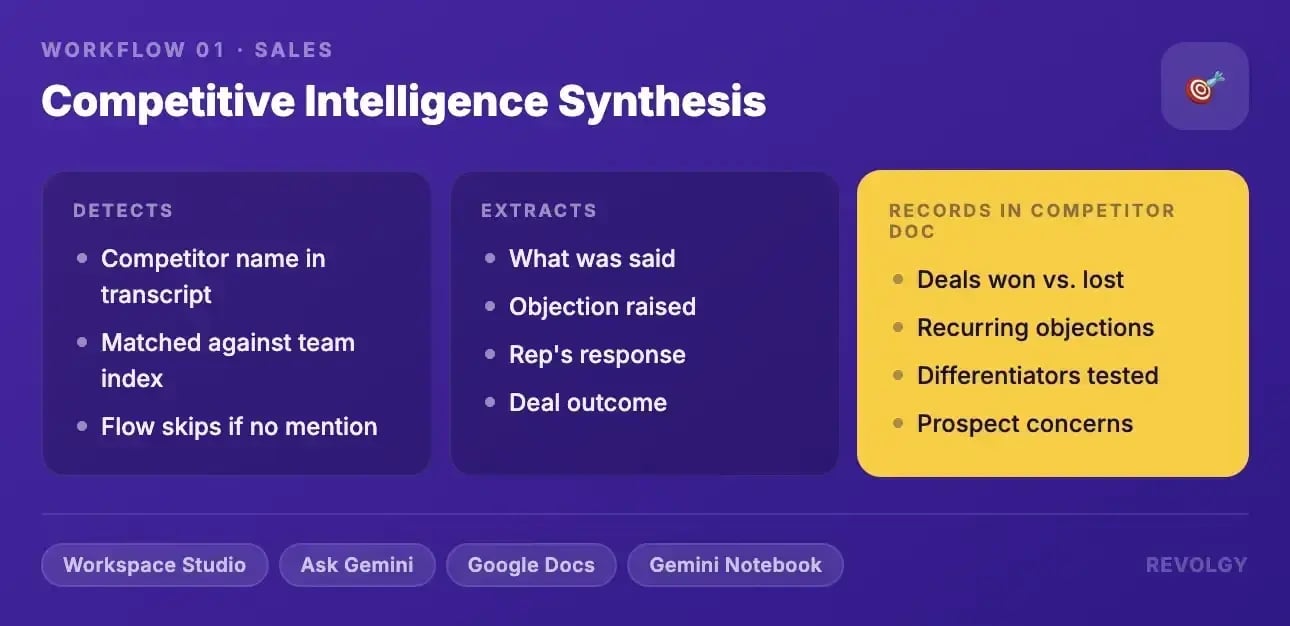
Sales teams track competitors through battlecards, but battlecards are written from product positioning documents, not from what actually happens when that competitor shows up in a live deal.
The real competitive intelligence is in the transcripts: what the competitor claimed about your pricing, how the rep responded, which objection almost flipped the deal, which client concern they amplified.
Across a team of ten reps running thirty competitive deals a quarter, that is thirty transcripts’ worth of signal that nobody has ever read together. A competitor intelligence document built from those transcripts, updated automatically after every deal where the competitor is mentioned, turns scattered rep experience into a record that gets more useful after every deal.
To build it from scratch:
- Create a competitor intelligence document in Google Drive for each competitor you track regularly. Structure it in sections: differentiators your reps have tested in real deals, clients you have won against them and what moved the decision, clients you have lost to them and the stated reason, and objections that came up more than once.
- Create a Google Sheet as your competitor index: one row per competitor, with a link to their intelligence document and a column for the competitor tag your team uses in call notes. Agree on one naming convention across the team: “Salesforce”, not “SFDC” or “the Salesforce deal”.
- Open Workspace Studio and create a flow with the starter “When a new file is added to a Drive folder”, pointed at the folder where the sales team’s Meet transcripts are saved.
- Add an Ask Gemini step that reads the new transcript and checks whether any competitor names from your index appear in it. If none appear, the flow ends without writing anything.
- If a competitor is mentioned, add a second Ask Gemini step that extracts the competitive context: what was said about the competitor, what objection was raised, how the rep responded, the client’s stated concern, and the deal outcome if mentioned.
- Add a Google Docs step that appends the extracted context as a dated entry to that competitor’s intelligence document, with the account name and deal stage noted so future readers know the source.
- Before a deal where that competitor is active, the rep opens the competitor intelligence document and asks Gemini in the Docs side panel: what objections has this competitor raised before, which clients have we beaten them on and why, and what concerns should I expect from this prospect based on past deals?
- For cross-competitor synthesis, such as a quarterly competitive review, use Gemini Notebook instead and upload all competitor intelligence documents as sources. Notebook answers only from those documents and cites the exact entry each answer came from.
Where the human stays in the loop. Sales enablement or product marketing owns each competitor document and reviews new entries monthly, because a transcript entry records what was said, not whether it was accurate.
2. Personal thought leadership agent
A sales rep running an active pipeline spends much of the week in buyer conversations. Across a quarter, that is hundreds of hours of direct access to how buyers at specific company types and sizes describe their problems, what objections they raise, and what finally moves them.
Most of that insight stays in the rep’s head, because turning a real conversation into a good post takes hours they do not have. A weekly Studio flow reads the rep’s transcripts, pulls out the patterns and sharpest moments from that week’s calls, and develops the strongest one into a LinkedIn draft.
To build it from scratch:
- Create a personal transcripts folder in Drive where your Meet transcripts are saved. This needs Meet recording and transcription enabled for your account in the Admin console.
- Create a personal signal document in Drive: a running record of patterns, sharp moments and market observations from your own calls.
- Open Workspace Studio and create a scheduled flow that runs every Friday.
- Add an Ask Gemini step that reads the transcripts added to the folder that week and extracts the key claims, objections, unusual perspectives and overall insights.
- Add a Google Docs step that appends those signals as a dated entry to your signal document, so the record builds up week by week.
- Add a second Ask Gemini step that develops the strongest signal into a full LinkedIn post draft and saves it to a Doc. The prompt tells Gemini to write in the first person, as a practitioner, in your own voice, tone and language.
Where the human stays in the loop. The rep reads, edits and posts the draft themselves. Nothing goes out automatically, and anything that could identify a client or deal comes out before it is published.
3. Account intelligence synthesis
When an AE needs a complete picture of an account, for a renewal conversation, an expansion play, a case study or a handoff to a new team member, the information sits in five or six different places:
- the original discovery transcript,
- the onboarding call notes,
- email threads from the first three months,
- a check-in summary someone wrote in a Doc last quarter,
- and whatever the AE remembers from a conversation that was never written down.
Assembling it by hand takes the better part of a day, and it happens at the exact moment the AE has the least time for it. Gemini in Google Workspace can read across every document, transcript and email summary tied to an account and produce a briefing in minutes.
To build it from scratch:
- Create a Drive folder for each account, with a transcripts subfolder. Meet transcripts save to the meeting organiser’s Drive when recording and transcription are enabled for the sales organisational unit in the Admin console, so the organiser moves each one into the right account folder.
- Create a Google Sheet as your account index: one row per account, with columns for the account name, AE owner, transcript folder link, account intelligence document link, contract start date, renewal date and key stakeholders.
- Create one Google Doc per account, the account intelligence document: the running record of the whole relationship, updated after every client call.
- Open Workspace Studio and create a flow with the starter “When a new file is added to a Drive folder”, pointed at the account’s transcripts subfolder.
- Add an Ask Gemini step that reads the new transcript and extracts the key points from the call: decisions made, open questions, stakeholders involved, risks and next steps.
- Add a Google Docs step that appends those points as a dated entry to the account intelligence document, so every call adds a new layer to the same record without overwriting what came before.
- When you need a full account synthesis for a renewal, an expansion conversation, a case study brief or an AE handoff, open the account intelligence document and ask Gemini in the Docs side panel to summarise across all entries.
- For accounts with many entries, use Gemini Notebook instead, with the account intelligence document as the source. Notebook cites the exact entry each answer came from, which matters when the AE needs to know whether a claim comes from the original discovery call or last month’s check-in.
Where the human stays in the loop. The AE reviews the synthesis before it informs any external conversation or document, because Gemini only reads what was written down, and the relationship can hold context that never made it into a transcript.
4. RFP and security questionnaire response drafting
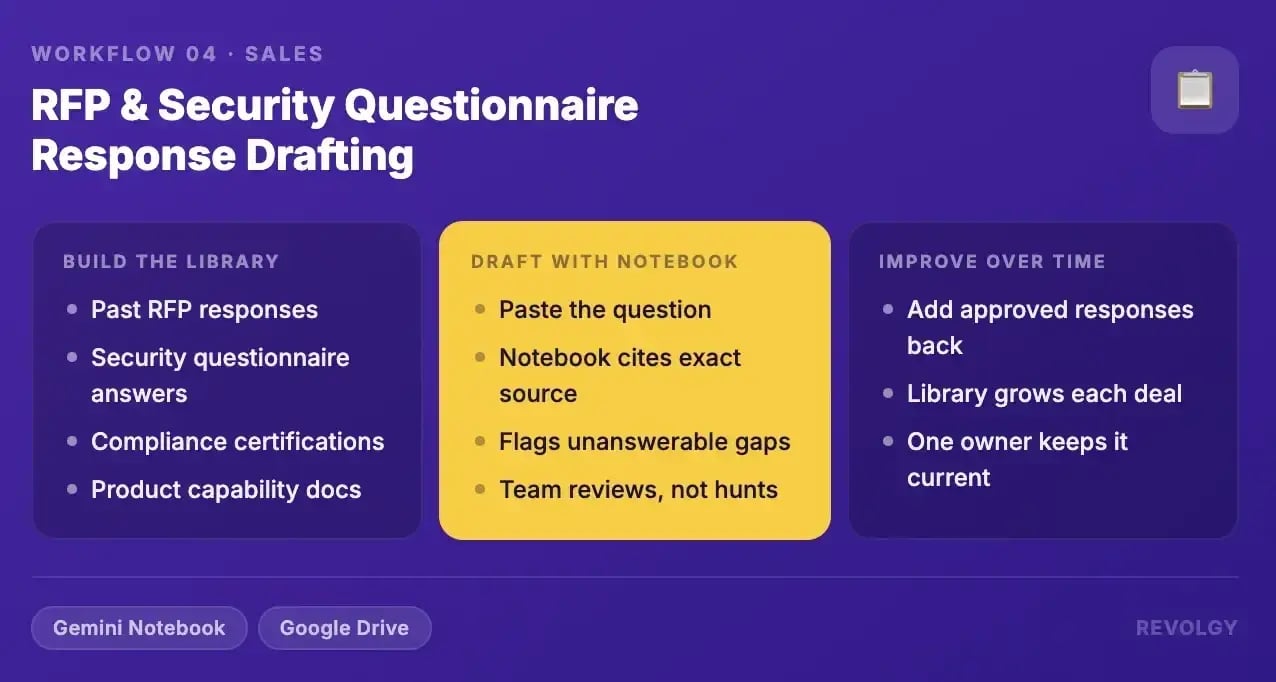
An enterprise deal triggers a request for proposal or a security questionnaire. The pre-sales team opens a shared Drive folder that has not been properly organised since it was created, searches for the last time a similar question came up, copies the answer, and checks by hand whether the compliance details still apply.
On a questionnaire with sixty questions, that process runs sixty times. Gemini Notebook built on a curated library of past responses turns that search into a question-and-answer process: the team asks by question type, gets a cited draft, and reviews it instead of hunting for a starting point.
To build it from scratch:
- Collect your best previous RFP responses, security questionnaire answers, product capability documentation and current compliance certifications in a single Drive folder. Quality matters more than quantity: ten well-answered RFPs are more useful than forty partial ones.
- Open Gemini Notebook, create a notebook for RFP and security responses, and upload the collected documents as sources.
- When a new RFP or questionnaire arrives, paste each question or section into the notebook and ask it to draft a response based on previous answers. Notebook cites the exact document and section each answer draws from, so the team can check it is still current before using it.
- When the notebook cannot answer from existing sources, it says so. That is useful too: it shows the gaps in your response library that need writing once and adding as source documents.
- As you complete new RFPs, add the approved final responses back into the notebook so the library improves after every deal.
- Make one person on the solutions or pre-sales team the library owner, responsible for updating source documents when product capabilities or compliance certifications change.
Where the human stays in the loop. The solutions or pre-sales team reviews every response the notebook drafts. The workflow removes the search and first-draft work, not the review.
Get started with a Revolgy AI adoption assessment
Revolgy is a Google Cloud Premier Partner with 25+ years in the cloud and more than 40 certifications. We run Google AI adoption as a full program, from the first Workspace assessment to building complex agents on the Gemini Enterprise Agent Platform. In an AI adoption assessment, you get that experience applied to your sales team:
- An audit of your Workspace edition and which Gemini features are already active, so you know what you pay for before building anything.
- A map of the sales workflows ready to automate now, sorted across Gemini in the apps, Workspace Studio and Gemini Enterprise.
- The governance and access controls your IT team needs in place before any agent goes live.
The assessment is a working session with a senior Revolgy expert. You bring your current Workspace setup and the sales processes eating the most hours. You leave with a written plan for what to automate today and what to build on Gemini Enterprise.
Not sure which sales workflow to automate first? Let’s map it together.
Bring your Workspace setup and the sales processes eating the most hours to a senior Revolgy expert. No slides, no sales pitch.
Frequently asked questions
Which sales workflow should we automate first with Google AI?
Start with competitive intelligence synthesis. It runs on a trigger Studio already supports, needs no new licence on Business Standard or above, and pays off quickly: every deal where a competitor appears adds a new entry to the intelligence document, so it becomes more useful every quarter.
Can Workspace Studio read from our CRM and update deal records automatically?
No. Studio cannot read from or write to Salesforce, HubSpot or any other external CRM. That belongs to the Gemini Enterprise layer, licensed separately, where an agent connects to your sales system under IT governance.
Will the competitor intelligence document stay accurate over time?
Only with an assigned owner. The document captures what was said in transcripts, not whether those claims were accurate. Ask sales enablement or product marketing to review entries monthly. Without that owner, a competitor claim a rep did not challenge enters the document as fact and stays there.
Can Gemini Notebook draft RFP responses without making up details?
Notebook answers from the documents you upload as sources and cites exactly where each answer comes from, so every claim can be traced back and checked. The pre-sales team should still review each draft before it goes to a prospect.
Does Google use our prospect and customer call transcripts to train its AI models?
No. On a paid Workspace account, your interactions with Gemini stay within your organisation, and your content is not used to train models outside your domain without your permission, per Google’s Gemini privacy documentation. All transcripts, documents and flows these workflows touch fall under your existing Workspace security protections.


