Google Workspace, Startups & Scale-ups

Choosing team wiki software is one of those decisions that looks small and compounds daily. Employees spend nearly 20% of the workweek looking for internal information.
The four most common candidates are not four versions of the same product. Google Sites is a no-code site builder that arranges content living in Drive. Notion is a block-based database that holds the content itself. Confluence is a structured page hierarchy organized into spaces. SharePoint is a document management system with an intranet layer on top.
That architectural difference, far more than any feature list, decides which one will still be working for you in two years. And because two of the four are already included in suites most companies pay for, the comparison that matters is rarely list price against list price. It is the incremental cost against what your licenses already cover, which is the math this guide runs.
Jump to section:
Google Sites vs Notion vs Confluence vs SharePoint: detailed overview
Google Sites vs Notion vs Confluence vs SharePoint: Choose the best team wiki software
How to choose team wiki software: 7 factors that actually decide it
Which team wiki should you choose?
Get expert help building your team wiki with Revolgy
Frequently asked questions about team wiki software
Google Sites vs Notion vs Confluence vs SharePoint: detailed overview
Google Sites: best team wiki software for Google Workspace organizations
The architectural point first, because everything else follows from it: Sites is the front door, and Drive plus Docs is the wiki.
Content stays in Docs, where it is already searched, permissioned, versioned, and covered by Vault and DLP. Sites arranges that content into navigable hub pages with embedded Docs, Sheets, Forms, and Calendars that update live at the source, edited through a drag-and-drop interface a non-technical owner can run without training.
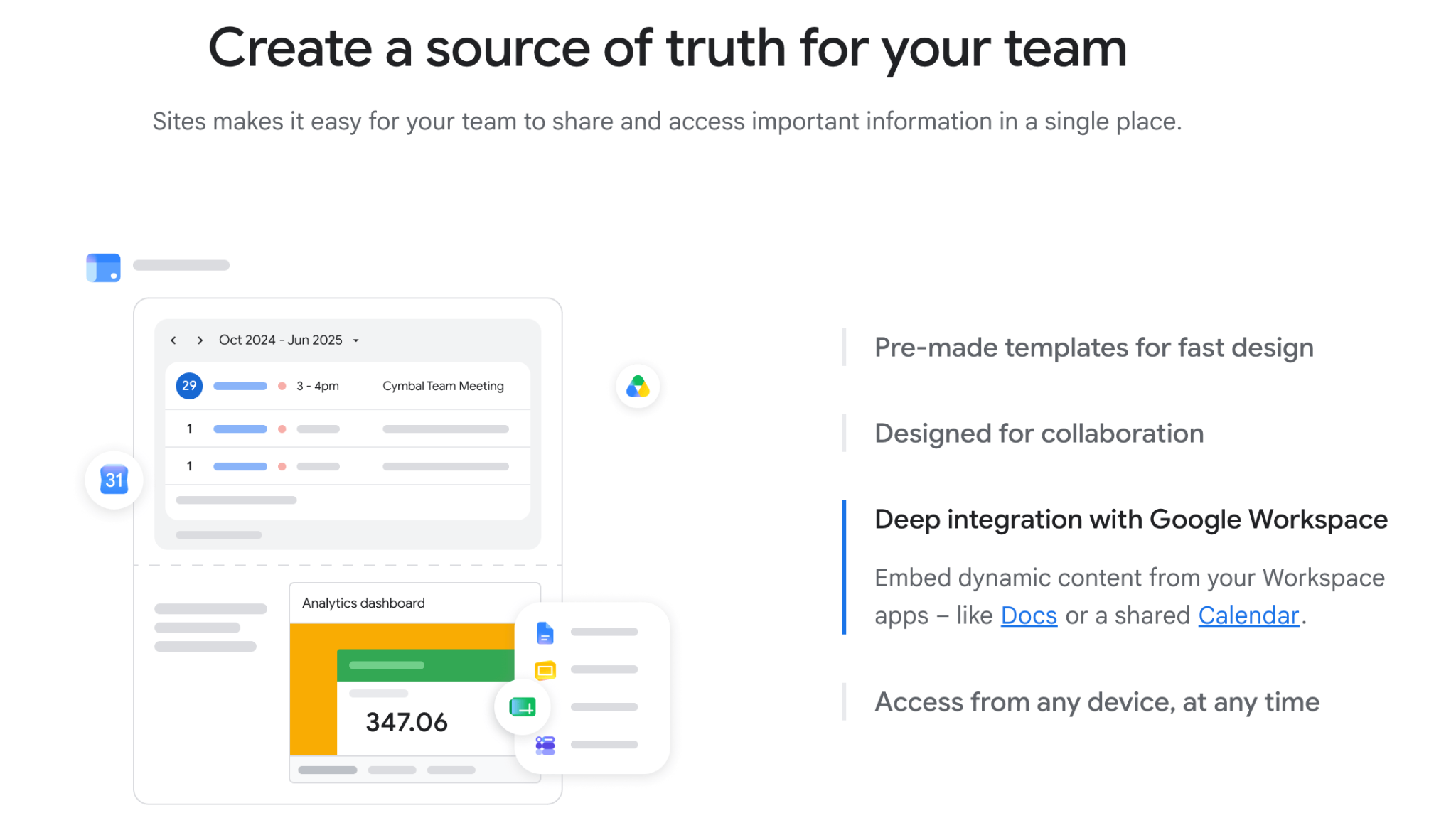
Image source: Google
What it wins on is exactly what the architecture predicts.
- Incremental cost is zero on any Workspace edition.
- There is no migration, because the content already lives in Drive.
- There is no new vendor security review, no new DPA, no new permission model, since access rides on existing Google Groups.
- For documentation hubs, team homepages, and policy libraries in a Workspace shop, it is the fastest possible path from nothing to a working wiki.
The restrictions deserve equal clarity.
- There are no structured databases, so anything relational gets improvised in Sheets.
- Page analytics are minimal, so you will not know which content works.
- Search quality is inherited from Drive, which means it is only as good as your naming discipline.
- And the dynamic intranet features that internal comms teams expect, news targeting, social feeds, engagement metrics, are missing.
Notion: best team wiki software for flexible all-in-one workspaces
Notion assumes no suite and is built to become one. Its unit is the block, and any page can hold text, embeds, and relational databases viewed as tables, boards, calendars, or timelines.
The same content renders differently for different audiences, which no other tool here does.
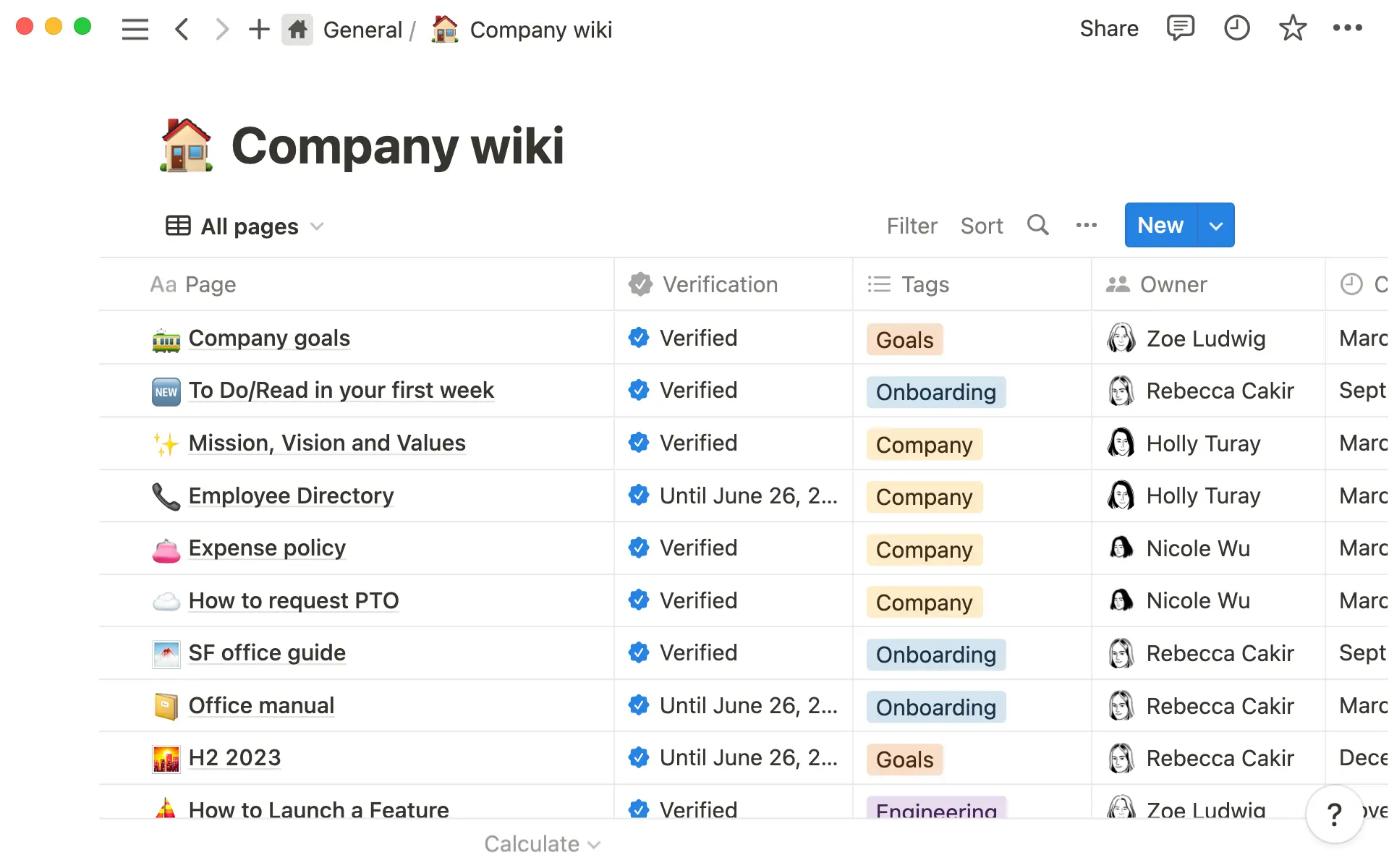
Image source: Notion
It wins on three things.
- The editing experience is the best in the category, which matters because wikis live or die on whether people write in them.
- The databases turn the wiki into an operating layer: OKRs linked to projects linked to meeting notes, queried rather than browsed.
- And the free tier is the strongest entry point of the four, which is why Notion spreads bottom-up through companies before IT has an opinion.
The restrictions are the mirror image.
- Cost compounds fastest of the four once AI matters. Notion bundled full AI exclusively into its Business and Enterprise tiers in early 2026, which means teams that want AI pay Business-tier prices across every seat, with no option to add it selectively.
- There is no self-hosted or private cloud option, a hard stop for some regulated sectors.
- And the flexibility has a documented bill: without a dedicated admin enforcing structure, workspace quality degrades predictably past 100 employees.
Confluence: best team wiki software for engineering teams on Jira
Confluence assumes Atlassian. Its unit is the page inside a space, with hierarchy, templates, and page properties designed for documentation that must stay consistent: specs, runbooks, decision logs, postmortems.

Image source: Atlassian
It wins where structure and development workflow meet.
- It is the cheapest paid option per seat, and Rovo AI is included from the Standard tier rather than sold as an add-on, which makes its AI economics the best of the paid tools.
- The Jira integration is the moat: tickets, sprints, and incidents render live inside pages, so documentation and work refer to each other instead of drifting apart.
- And Confluence Data Center is the only genuine self-hosting path in this comparison, which keeps it on regulated shortlists.
The restrictions:
- Outside an Atlassian shop, most of the value evaporates, and you are paying for integrations you do not have.
- Search complaints are persistent in user reviews, as are slowdowns on large instances.
- An important cost factor is storage: Standard's 250GB cap has no overage option, just a full tier upgrade to Premium when you hit it.
SharePoint: best team wiki software for Microsoft 365 organizations
SharePoint is the Google Sites of the Microsoft column: already paid for, already governed, already integrated. It is a document management system first, with an intranet layer of sites, pages, and lists built above it, surfaced through Teams and Outlook.
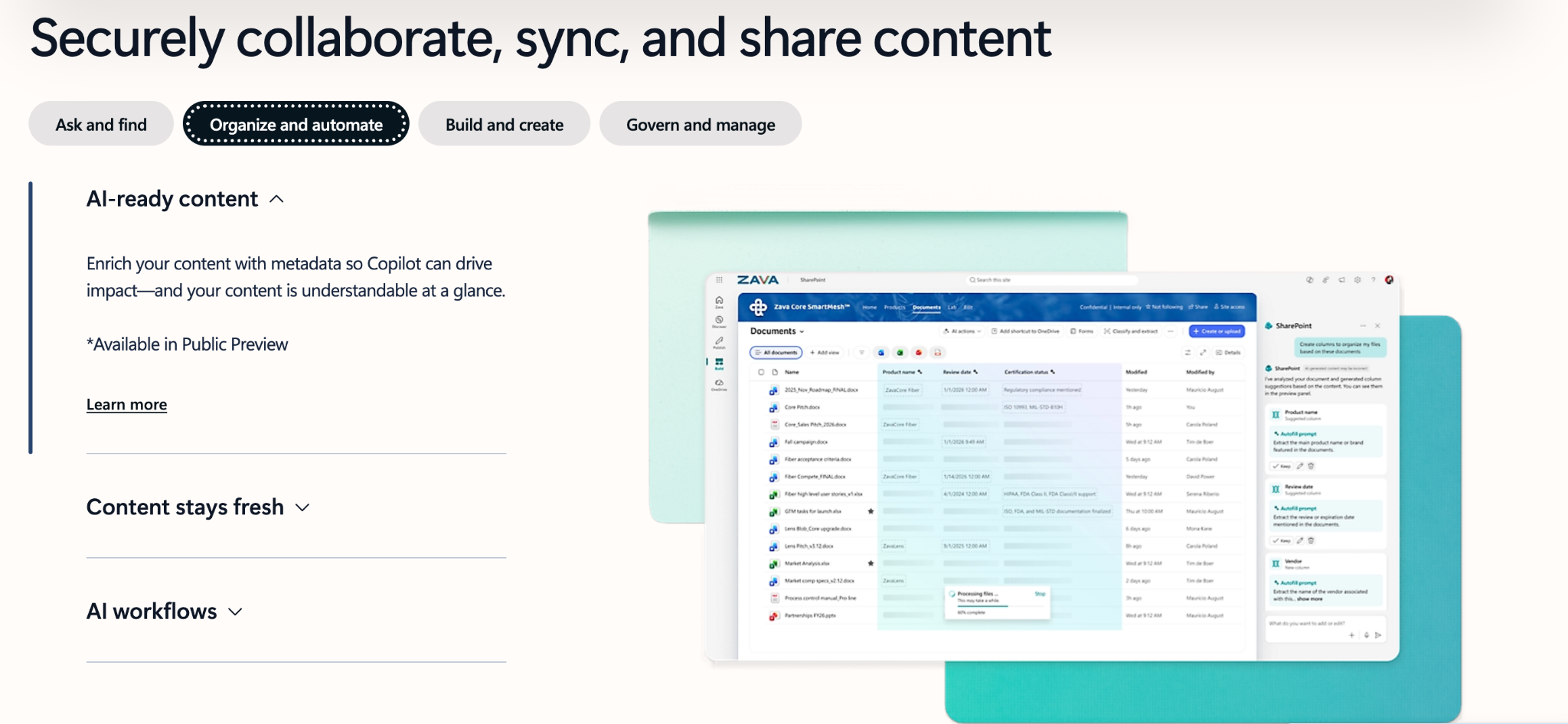
Image source: Microsoft
It wins on inclusion and control.
- Every M365 business plan includes it, so the incremental license cost for a Microsoft shop is zero.
- Its compliance and records tooling is the most mature of the four, with retention labels, records management, granular permissions, and a HIPAA BAA available through the Microsoft Trust Portal.
- At enterprise scale, audience targeting and multilingual publishing make it a real internal comms platform, which none of the other three are.
The restrictions:
- Authoring is page-building rather than wiki writing. Composing a SharePoint page feels like assembling an intranet site from web parts, which is why a common enterprise pattern is SharePoint for the intranet plus a separate tool, often Confluence, for the engineering wiki.
- Admin complexity is the highest of the four, and the permission model rewards expertise and punishes its absence.
- AI requires a separate Copilot add-on at $30 per user per month on enterprise M365 plans, or $21 on business plans from July 2026, on top of the base M365 license in both cases.
- And exports do not carry metadata and permissions cleanly, so the exit cost is real.
Google Sites vs Notion vs Confluence vs SharePoint: Choose the best team wiki software in 2026
|
Dimension |
Google Sites |
Notion |
Confluence |
SharePoint |
|
Architecture |
Site builder over Drive content |
Block-based database workspace |
Structured page hierarchy in spaces |
Document management system and intranet platform built on hub-spoke site architecture |
|
Best for |
Workspace shops: doc hubs, team sites, policy libraries |
Sub-100 teams wanting wiki + ops in one tool |
Engineering documentation tied to Jira |
M365 shops: intranet, records, compliance |
|
Included in an existing suite |
Yes, every Workspace edition |
No |
No (free tier to 10 users) |
Yes, every M365 business plan |
|
Incremental cost, 50-person Workspace shop |
$0 |
$10,800/yr (Business, $18/user/mo annual, 2026) |
~$3,250/yr (Standard) |
n/a without M365 licenses |
|
Standalone pricing |
Included in Workspace (from ~$7/user/mo Starter) |
Plus $10/user/mo, Business $18/user/mo |
Standard $5.42/user/mo (annual); Premium $10.44/user/mo |
Included in M365 Business Standard ($12.50/user/mo annual); standalone Plan 1 ($5) being retired from May 2026 |
|
Free tier |
Included in all paid Workspace editions + Essentials Starter free tier available with limited features |
Yes, unlimited pages/blocks, 10 guests, 7-day history, no time limit |
Yes, up to 10 users |
No standalone free tier |
|
AI availability and cost |
Gemini included in Business/Enterprise plans since Jan 2025 |
Full AI gated to Business and Enterprise only |
Rovo included from Standard (25 credits/user/mo); higher allowances at Premium |
$30/user/mo (enterprise) or $21/user/mo (business plans, from July 2026); not included in any base plan |
|
Editor and authoring |
Drag-and-drop pages; writing happens in Docs |
Best-in-category block editor |
Structured pages, templates, page properties |
Web-part page assembly |
|
Structured databases |
No (Sheets embeds as workaround) |
Yes, relational, multiple views |
Limited (page properties, database fields) |
Lists (powerful, admin-heavy) |
|
Search |
Drive search; depends on file hygiene |
Fast but flat at scale |
Persistent search complaints across user reviews and Atlassian community forums |
Powerful, metadata-dependent |
|
Permissions model |
Inherits Google Groups and Drive sharing |
Workspace/teamspace/page levels |
Space and page permissions |
Most granular; misconfiguration risk |
|
External and guest sharing |
Via Drive sharing rules |
10–100+ guests by tier |
Guest access on paid tiers |
Mature external sharing controls |
|
Version history |
Full Docs version history |
30-day on Plus, longer up |
Full page versioning |
Full versioning + records |
|
Page analytics |
Minimal |
Page analytics on paid tiers |
View analytics on paid tiers |
Full usage analytics |
|
Compliance and retention |
Vault and eDiscovery from Business Plus; DLP at Enterprise only; GDPR compliant across all plans |
SOC 2 Type II, GDPR; SaaS-only |
SOC 2 Type II, SOC 3, ISO 27001, PCI DSS, GDPR; Data Center for self-hosted deployment |
Most mature; HIPAA BAA, records management |
|
Self-hosting |
No |
No |
Yes (Data Center) |
SharePoint Server (separate on-prem product); SharePoint Online is cloud-only |
|
Migration in |
Content already in Drive |
CSV/Markdown/HTML import |
Importers incl. legacy wikis, Notion |
Microsoft migration tooling, IT-led |
|
Export and lock-in |
Content is portable Docs/Drive files |
Labor-intensive at scale |
Standard exports; permission mapping work |
Metadata/permissions don't export cleanly |
|
Admin and maintenance overhead |
Near zero; no review workflows |
Low to start, grows with sprawl |
Moderate to high; strong governance tooling |
Highest of the four |
|
Learning curve |
Lowest |
Low to write, high to structure well |
Moderate |
Steepest |
|
Performance at scale |
Tied to Drive; comms ceiling at hundreds of users |
Sluggish on databases past ~5,000 rows |
Slowdowns reported on large instances |
Built for enterprise scale |
|
Top pros |
$0 incremental, no migration, inherited governance |
Editor, databases, free tier |
Price + included AI, Jira depth, self-host option |
Included in M365, compliance depth, comms at scale |
|
Top cons |
No databases, weak analytics, comms ceiling |
AI cost gating, SaaS-only, sprawl pattern |
Weak outside Atlassian, search complaints |
Authoring experience, admin complexity, Copilot cost |
How to choose team wiki software: 7 factors that actually decide it
Total cost of ownership
Start from what you already pay for. Google Sites is included in every Google Workspace edition, and SharePoint is included in every Microsoft 365 business plan, which means most readers of this comparison already own two of the four candidates. The honest baseline for any new wiki license is therefore not Is it worth $8 per user? but Is it worth $8 per user more than the option I have at zero?
The full cost stack has five layers. Per-seat licensing is the visible one:
- Confluence Standard runs $5.42 per user per month on monthly billing (lower on annual commitment),
- Notion Plus is $10 per user per month, and Business is $15 per user per month, both on annual billing.
- SharePoint no longer exists as a meaningful standalone purchase: Microsoft announced the retirement of standalone SharePoint plans in January 2026 and ended sales to new customers from June 2026, making Microsoft 365 Business Basic at $7 per user per month the practical entry point for SharePoint access.
AI access is the second and increasingly decisive layer:
- Rovo is included with paid Confluence plans from the Standard tier,
- Gemini has been included in Workspace Business and Enterprise plans since January 2025,
- Notion gates full AI to its Business tier, and
- SharePoint's AI requires Microsoft 365 Copilot as a separate add-on at $30 per user per month on enterprise plans or $21 on business plans from July 2026.
Then come the three layers nobody budgets: migration labor, ongoing admin time, and the cost of operating a second permission model alongside your suite's.
The compounding shows up fast at team scale. A 50-person team pays roughly $3,250 per year on Confluence Standard and roughly $9,000 per year on Notion Business at annual billing rates. The same team pays zero incremental cost on Sites or SharePoint if the suite is already licensed.
Fit with your existing stack
Stack fit is the strongest predictor of whether the best team wiki software gets used. A wiki that lives where work already happens gets read in the flow of that work; a wiki that is one login away decays quietly until someone proposes replacing it.
In a Workspace shop, Sites pages embed Docs, Sheets, Slides, Forms, and Calendars that update live at the source, and access rides on the Google Groups you already maintain. In an M365 shop, SharePoint surfaces inside Teams, shares storage with OneDrive, and pushes news through Outlook. In a Jira shop, Confluence renders tickets, sprints, and incident timelines inside documentation pages. Notion assumes no suite at all and is built to become one, which is either its best feature or its biggest cost depending on what you already run.
Governance, permissions, and data sprawl
Where content physically lives determines who can audit it, what retention applies to it, and what happens to it when its author leaves. A wiki whose content sits in Drive inherits the sharing rules, Vault retention, and data loss prevention policies your admin already operates. A wiki in a new vendor's cloud adds a new permission model, a new data processing agreement to review, and a new line on every offboarding checklist.
Sprawl is the documented failure mode of the flexible options. Notion wiki quality at 100 or more employees degrades predictably without a dedicated admin. SharePoint has the opposite problem: its permission model is granular enough that misconfiguration is its own failure category, which is why SharePoint estates accumulate consultants.
Structure and content model
Three different jobs hide inside the word "wiki." Communications-style intranet pages are layout-driven: announcements, policy hubs, directories. Structured reference documentation is hierarchy-driven: specs, runbooks, decision logs that need consistent templates and version discipline. Relational databases are data-driven: OKRs linked to projects linked to meeting notes.
Each tool was built for one of these jobs. Sites was built for the first, Confluence for the second, Notion for the third, and SharePoint for managing the documents underneath all three. The expensive mistakes come from mismatches: forcing Sites to be a database, forcing SharePoint to be an authoring wiki, or forcing Notion to be a controlled document system.
Maintenance burden and ownership
More wikis die of staleness than of missing features.
The tools distribute this burden differently. Sites is near-zero administration but offers no review workflows, so freshness depends entirely on culture. Confluence and SharePoint carry the strongest governance tooling, page ownership, review dates, retention labels, and the highest admin cost to run it. Notion has the widest gap of the four between how easy it is to create and how hard it is to maintain.
Whichever way the comparison lands, the standing rule is the same: assign a named owner before buying anything, because no tool on this page survives without one.
Compliance, residency, and exit
For regulated teams, three questions outrank features.
First, certifications and tooling: SharePoint carries the most mature compliance and records management stack of the four, including HIPAA BAA support, while Confluence and Notion both offer SOC 2 Type II and GDPR compliance, and Workspace brings Vault, retention, and DLP to anything living in Drive.
Second, hosting: Confluence Data Center is the only true self-hosting path among the four; Notion is SaaS-only, which is a hard blocker in some regulated sectors. Third, exit: SharePoint exports do not carry metadata and permissions cleanly, and large Notion migrations are labor-intensive enough to need custom scripts. Lock-in is a cost. Price it on the way in, because you will pay it on the way out.
Which team wiki should you choose?
The honest answer is a factor equation, not a brand. Take the criteria from the first section, weigh them for your situation, and the recommendation falls out. These are the five combinations that cover most teams.
If you run Google Workspace and need a working wiki this quarter: Google Sites
If you already run Workspace and the priority is a working wiki this quarter with no new spend, the system you own is the answer. A 60-person services company runs this build today:
- a Sites homepage carrying announcements,
- an HR section embedding policy Docs that update live when HR edits the source,
- an IT request portal built on a Form writing into a Sheet the IT lead works from,
- a people directory embedded from a Sheet,
- and the company Calendar embedded on the events page.
- Access rides on existing Google Groups, every document stays searchable in Drive, and the new license cost is zero.
What this build does not give you is databases and analytics; if those become real needs, you will know, and you will have paid nothing to find out.
If no suite has your loyalty and the team is under 100 people: Notion
If no suite has your loyalty, the team is small, and you want the wiki to double as the operating system, Notion is the strongest tool in this comparison.
A 30-person startup runs company home, an OKR database linked to project pages, meeting notes related to both, and a lightweight CRM in a single workspace, which no other option here can replicate.
The only demand: name an admin who owns the structure on day one, because the documented sprawl pattern past 100 employees is what happens when nobody does.
If your engineering team runs Jira: Confluence
If the factor mix is structured docs, version discipline, and development workflow integration, Confluence wins regardless of which suite runs your email. A platform team keeps runbooks that link live Jira incidents, decision logs with enforced page properties, and spec templates standardized per space.
This recommendation coexists with either suite: Workspace shops running Jira commonly run Confluence for the engineering wiki alone, and the Standard tier's price with Rovo included keeps that defensible.
If you run Microsoft 365 and have formal compliance requirements: SharePoint
If you run M365 and the requirements include formal retention, records management, or comms at enterprise scale, SharePoint is the right default for the same reason Sites is on the other side: it is already licensed and already governed. An 800-person manufacturer runs audience-targeted news, ISO document control under retention labels, and the whole thing surfaced in Teams.
The caveat from the comparison stands: engineering teams in that same company will likely still want a real authoring wiki beside it.
If you prefer lowest cost overall: Google Workspace as the system
If you are choosing a suite and a wiki at the same time, run the combined math.
A Workspace Business Standard plan covers the wiki front end (Sites), the content layer (Docs and Drive), the database substitute (Sheets), request workflows (Forms, with Apps Script when they outgrow it), and AI (Gemini), under one license, one admin console, and one permission model, at $14 per user per month on annual billing. For 50 people that is $8,400 per year all-in.
A team choosing a separate productivity suite plus Notion Business pays roughly $9,000 per year for Notion alone at $15/user/month annual billing, on top of whatever the suite costs. Add Confluence Standard instead, and that is roughly $3,250 per year on top of the suite. In both cases, you are also operating a second permission model, a second vendor DPA, and a second offboarding checklist. None of those appear on the invoice.
Whichever combination matches yours, the universal condition holds: every option on this page fails without an owner. Assign one before you choose anything.
Get expert help building your team wiki with Revolgy
If you are convinced Google Sites + Docs + Drive is the perfect choice for your team but are not sure where to get started, Revolgy can help!
Revolgy is a certified Google Cloud Premier Partner that deploys and manages Workspace environments across the globe, including knowledge architecture, security configuration, and Gemini adoption.
A typical engagement covers three things:
- Environment audit: Revolgy reviews your current Drive structure, permission model, and admin console setup to identify gaps before you build on top of them.
- Sites and content architecture: Revolgy designs the hub structure, folder hierarchy, and Group-based access model that makes a Sites-based wiki actually work at your team size.
- Gemini activation: Revolgy configures Gemini across Docs, Drive, and Meet so the AI your license already includes is actually in use.


Frequently asked questions about team wiki software
Is Google Sites good enough for a company wiki?
For organizations on Google Workspace, yes, with a scope: treat Sites as the navigation layer and Drive plus Docs as the content layer, and it handles documentation hubs, policy libraries, and team sites at zero incremental cost. The honest ceiling is formal internal communications at several hundred employees, where missing features like news targeting and engagement analytics justify evaluating dedicated intranet products.
What is the cheapest team wiki for small businesses?
If you already pay for Google Workspace, the cheapest team wiki for small businesses is Google Sites at zero additional cost.
Notion or Confluence: which is better for documentation?
Confluence is better for controlled, structured documentation: enforced templates, page hierarchies, versioning, and live Jira context, with AI included on paid plans. Notion is better when documentation should connect to operating data through relational databases, and the team is small enough to govern its own structure. The cost profiles differ sharply at scale: a 50-person team pays roughly three times more on Notion Business than Confluence Standard.
How do I migrate a wiki from Notion or Confluence to Google Workspace?
Export content (Notion supports Markdown, HTML, and CSV; Confluence offers space exports), convert pages into Docs organized in shared drives, and rebuild navigation as a Sites hub embedding those Docs. Plan the permission mapping first, since Google Groups become the access model, and budget manual cleanup for databases and macros that have no direct equivalent. For large workspaces, treat it as a project with an owner rather than a weekend task.